
6 min read ·
How to Replace a Volkswagen Key-Fob Battery Without Damaging the Key
Identify the exact coin-cell code, open the correct seam with light pressure, preserve its orientation, close every clip, and test all fitted buttons.
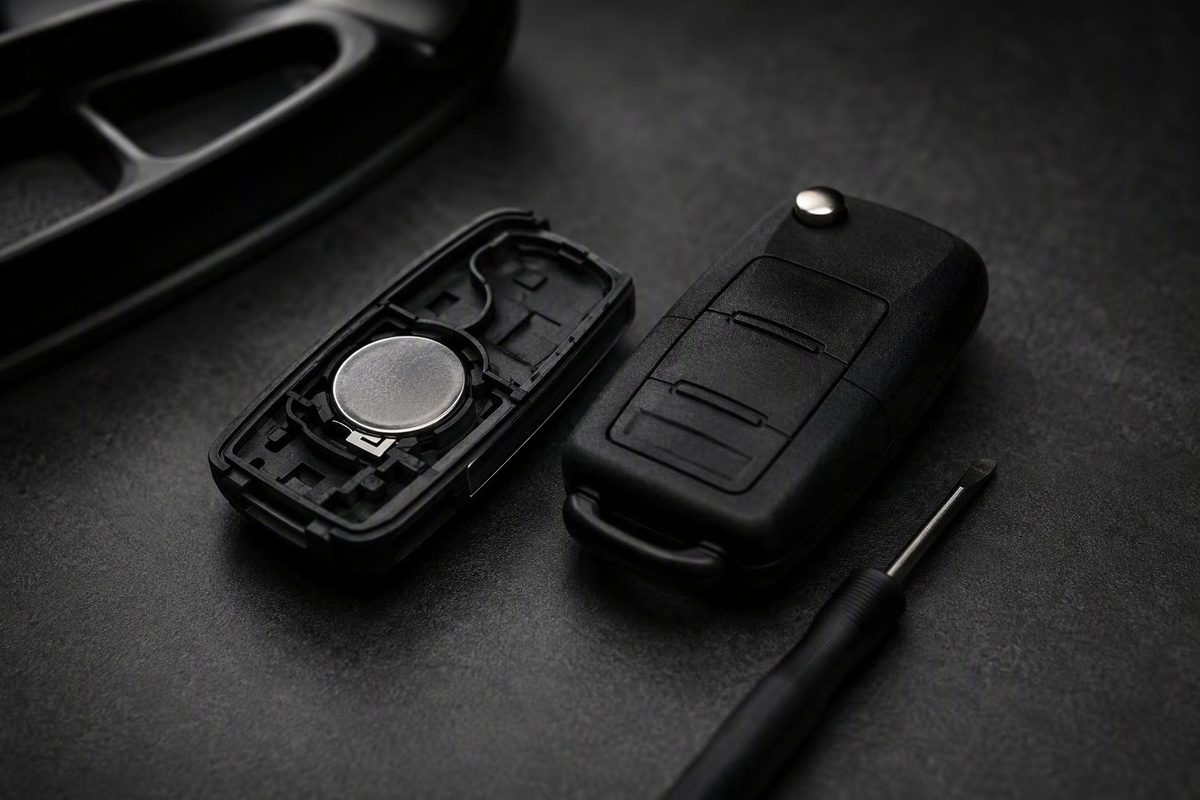
To change the battery in a VW key fob, release or remove the emergency key, open the correct housing seam gently, and replace the coin cell with the same battery code and orientation. Photograph the installed cell before removing it, close every case clip, and test the buttons near the vehicle. Do not assume every Volkswagen fob uses a CR2032 or that its positive side faces a universal direction.
VW key-fob battery replacement: the short version
Use this checklist:
- Identify the replacement battery. Check the complete code on the installed coin cell before buying another.
- Release the folding metal blade or remove the emergency key.
- Locate the housing seam for your exact fob.
- Photograph the old battery. Record both its code and orientation.
- Open the case gently. Start with a fingernail and use light twisting pressure from a small flat tool only when necessary.
- Remove the old cell carefully. Avoid disturbing the holder or internal components.
- Install a fresh battery with the same code, following the holder’s polarity symbols or the original orientation.
- Close the housing evenly. Make sure every clip engages and no gap remains.
- Return the emergency key to its normal position.
- Test every fitted button, including lock, unlock, trunk and panic.
The usual supplies are a fresh matching coin cell and, if the housing requires leverage, a small flat-head screwdriver or similar flat tool. Covering the tool tip with tape can reduce the chance of marking the housing.
Work over a clear table where the battery and case pieces are easy to see. This procedure is intended for an intact coin cell. Keep loose cells away from children and pets.
Volkswagen has used more than one fob construction. If the housing does not separate with light pressure, do not force it. Recheck the seam and look for instructions that match the exact fob before inserting a tool.
Confirm the battery before buying a replacement
CR2032 is commonly reported for many pod-style Volkswagen flip keys with a folding metal blade, while CR1632 may appear in some older, simpler or bulkier designs. These are identification clues, not guaranteed fitment rules; dealership guidance presents both battery types as probable rather than universal (see the Volkswagen key-battery guidance).
| Visible fob style | Commonly reported battery | Required verification |
|---|---|---|
| Older simple or bulky key style | Possibly CR1632 | Check the old cell and exact-key documentation |
| Pod-style flip key with folding blade | Commonly CR2032 | Check the old cell and holder |
| Unfamiliar or replacement fob | Do not infer | Consult its documentation before buying |
Match the full code. Model year alone may not identify the correct battery because the vehicle may have a different key configuration or a replacement fob.
If the old cell’s marking is unreadable—or the key is unfamiliar or has previously been replaced—consult documentation for that specific fob before buying. An online photograph of a similar-looking key is not enough to choose between CR2032 and CR1632.
Open the housing and install the new coin cell
The following opening methods are general patterns, not universal pry-point instructions. Set the fob on a clear work surface with the buttons positioned so they are not held down.
For a flip key with a folding metal blade, extend the blade and inspect the housing perimeter for its seam. Try creating a small opening with a fingernail. If the exact housing calls for a tool, insert only the protected tip and apply light twisting pressure rather than driving the tool into the case.
For a fob with a removable emergency key, operate the release and pull the key out. Inspect the newly exposed top edge for the cover seam. Some dealership instructions describe releasing this style with thumb pressure before using a screwdriver to remove the battery, but the procedure should be matched to the actual housing (compare the design-specific opening patterns).
Once the correct cover begins to move:
- Lift it gradually instead of pulling one side sharply.
- Photograph the installed battery before touching it.
- Record which face is visible and find any
+or−symbol in the holder. - Release the cell without bending or displacing the retaining contacts.
- Insert an exact-code replacement according to the holder markings or recorded orientation.
- Check that the cell sits flat and remains firmly retained.
There is no supported universal instruction to install every VW key-fob battery positive-side up or positive-side down. Heritage Volkswagen’s general procedure specifies positive-side down and also recommends a tape-covered tool and careful opening (read its replacement procedure).
By contrast, another Volkswagen dealership guide specifies positive-side up. That disagreement is why the holder symbols and original battery position should take precedence over a generic polarity instruction (see the positive-side-up guidance).
Avoid unnecessary contact with the fob’s internal parts. If the cover resists modest pressure or any component begins to deform, stop and verify the opening method instead of applying more force.
To reassemble the fob, align the housing halves and press around the perimeter evenly. Confirm that the clips are engaged and no visible gap remains. Reinstall the removable emergency key or fold the metal blade away, then test lock, unlock, trunk and panic functions where fitted.
What to check if the key still does not work
Reduced operating range, intermittent response, repeated button presses or complete failure can indicate a weak key-fob battery. A fresh cell will not correct every fob or vehicle fault, however.
- Battery code: Confirm that the full replacement code matches the intended cell.
- Battery condition: If its condition is uncertain, try another fresh cell from intact packaging.
- Polarity: Compare the installation with the holder symbols and your photograph.
- Seating: Make sure the battery lies flat and is held firmly beneath its contacts.
- Contacts: Inspect for visible dirt, corrosion, bending or displacement. Do not scrape or reshape delicate parts unless you understand the holder’s construction.
- Case closure: Check that the housing is fully snapped together and is not holding a button down.
If those checks do not restore operation, possible causes include a damaged button, internal fob damage, a synchronization or recognition issue, or another key or vehicle fault. These are possibilities to investigate, not diagnoses that can be made from the symptom alone.
Stop opening the fob if its clips deform, internal parts appear damaged or the vehicle continues not to recognize the key.
When synchronization or professional help may be needed
Battery replacement, remote synchronization, immobilizer programming and programming a newly obtained replacement key are separate tasks. Replacing the coin cell restores power to an existing fob; it does not itself perform the other procedures.
Frank Boucher Volkswagen says most VW fobs do not require reprogramming after a battery change, while noting that a nonworking fob may need reprogramming or internal service. That general statement does not establish the result for every model, market or key design (read the dealership guidance).
Volkswagen UK takes a more cautious position. It recommends retailer replacement because synchronization may be needed and says expert replacement may reduce the risk of losing stored key data and subsequent vehicle-recognition trouble. It does not say that synchronization is always required.
If a correctly matched, correctly oriented and firmly seated battery does not restore operation—or the vehicle stops recognizing the key—consult the model-specific owner’s manual. A Volkswagen retailer, qualified automotive locksmith or technician can determine whether the problem involves synchronization, programming, physical damage or the vehicle.
Avoid universal online synchronization or emergency-start sequences unless they are confirmed for the exact vehicle and key. The practical final checks are straightforward: match the complete battery code, preserve the original orientation and use only gentle pressure on the housing. If those points are correct but recognition still fails, stop short of improvised programming and obtain model-specific help.